Collection Management
Learn how to organize search results into structured, trackable sales campaigns
📂 Collection Management: Your Command Center
Think of the Collection Tab (indicated by the Folder icon) as your personal CRM. This is where you organize your scattered search results into structured, trackable sales campaigns.
Instead of managing one giant list of 5,000 companies, you segment them into Collections (e.g., "Banana in France" vs. "Banana in Middle East") to tailor your strategy for each market.
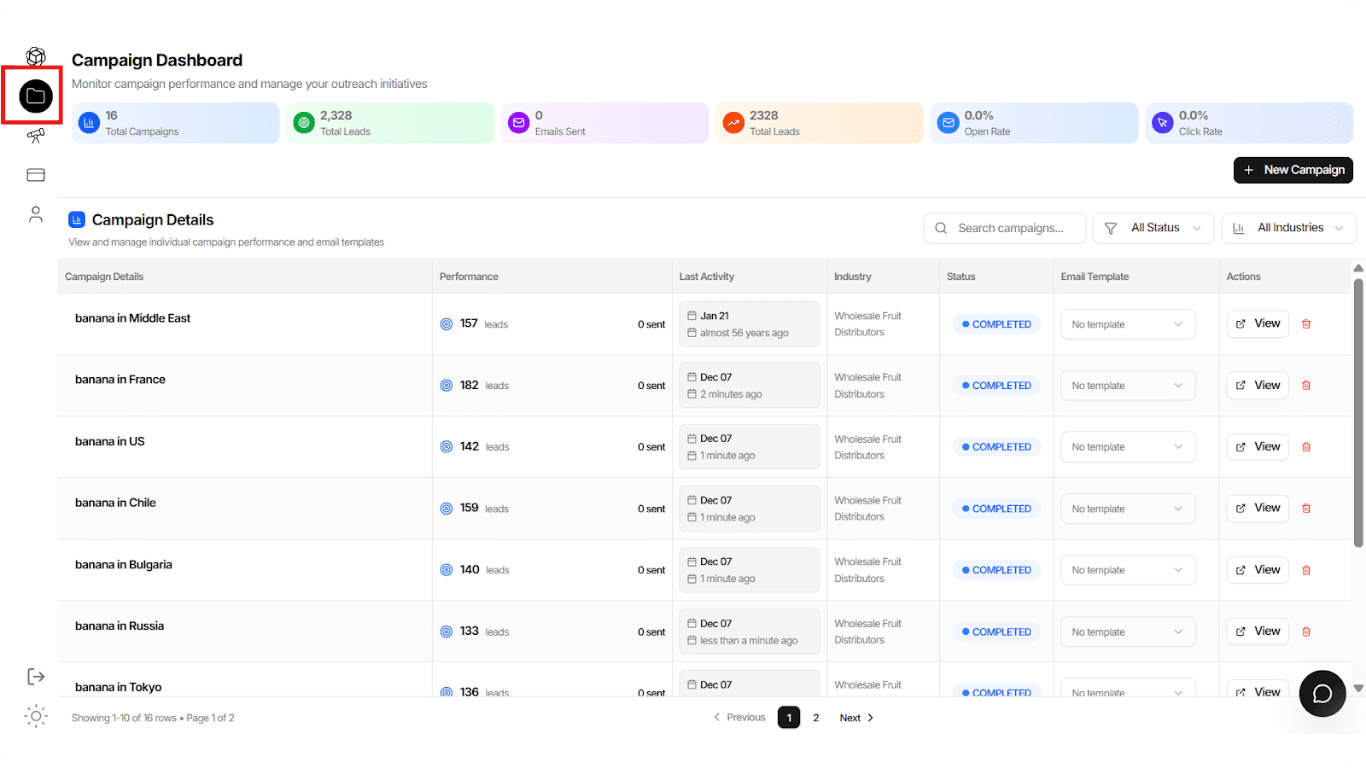
1. The Dashboard Overview
Navigation: Click the Folder Icon on the left sidebar.
At the top of the screen, you get an instant health check of your entire export business:
- Total Campaigns & Leads: How big is your pipeline? (e.g., 16 Campaigns, 2,328 Leads).
- Engagement Metrics: Track your Open Rate and Click Rate globally to see if your messaging is resonating.

💡 Insight
These metrics give you a bird's-eye view of your entire sales pipeline performance at a glance.
2. Managing Your Segments
The main table lists every "Collection" you have created. This allows you to segment your customers by:
Geography
Segment by location (e.g., "banana in US" vs. "banana in Russia").
Product Line
Separate your "Premium Coffee" leads from your "Commercial Grade Coffee" leads.
Status
Quickly see which campaigns are:
- Completed (search finished)
- Active (ongoing)
Use these segmentation options to create targeted strategies for each market segment.
3. Key Actions
Create New Collection
Click + New Campaign (top right) to:
- Start a fresh search, or
- Create an empty container for manual entry
Delete
Use the Trash Icon 🗑️ to remove outdated lists and keep your dashboard clean.
View Details
Click the View button next to any campaign.
Action: This drills down into the specific list of companies (the "Lead Analysis" view we discussed in the previous step), allowing you to see the individual businesses inside that collection.
💡 Pro Tip
Grouping your leads into smaller, specific collections (like "Wholesale Fruit Distributors" in "Bulgaria") allows you to write much more specific email templates, which increases your response rate!